
How to Check if Google Has Indexed Your Page in GSC

Updated: Aug 30
Quick Answer:
There are two ways to check your pages' indexability in Google Search Console (GSC). Paste the URL into the URL Inspection tool. If it shows "URL is on Google," the page is indexed. To see your whole site at once, open the Page Indexing report, where URLs are grouped as Indexed or Not Indexed.
You published a page last week, searched for it, and found nothing. Before you rewrite the content or blame the algorithm, check something as simple as whether your page is indexed or not.
Method 1: URL Inspection tool (the reliable single-page check)
For checking indexability on GSC, follow the given steps:
Step 1: Log in to Search Console

Step 2: Select your property
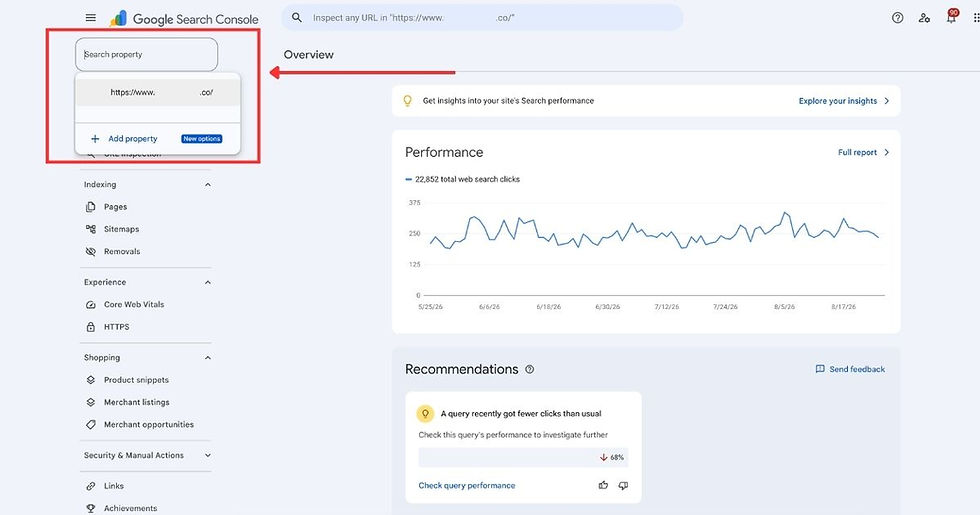
Step 3: Paste the full page URL into the inspection bar at the top

Step 4: Press Enter
Step 5: Read the verdict:

Verdict | What it means |
URL is on Google | Indexed, no issues found |
URL is on Google, but it has issues | Indexed, but an enhancement needs fixing |
URL is not on Google | Not Indexed. Expand Page indexing for the reason. |
Note: Google says "URL is on Google" means the page is eligible to appear in search results, not that it's guaranteed to rank on Google search results.
Method 2: Page Indexing report (your whole site at once)
Step 1: In Google Search Console, go to: Indexing → Pages

Step 2: Check the report of pages that are indexed and those that are not indexed.

Step 3: Open any reason under Why pages aren't indexed to see which URLs it affects.

Note: Have a small website with fewer than 500 pages? Google says you probably don't need this report. Instead, use the URL Inspection tool to check whether your important pages are indexed. If you use the report, think of it as a way to spot patterns, not as a complete audit of your site.
Your page isn't indexed. Now what?
Fix the blockers: The usual culprits are a robots.txt block, an incorrect canonical, or a stray noindex directive. Check for an accidental no-index tag first, since that's the most common cause.
Help Google find the page: Submit a sitemap to Google Search Console and confirm the URL is actually in it.
Add internal links: Link to the page from pages that are already indexed.
Request indexing, then check back in a week or two.
Key Takeaways
These checking methods will help you find out whether Google has indexed your pages. If several pages aren't indexed, the problem is usually more than just needing to request indexing. It could be a technical SEO issue, such as how Google crawls your site, how your pages are structured, or how your site is set up.
That's where Monday Graph can help. Book a Free SEO Masterplan, and we'll identify what's stopping your pages from being indexed.
FAQs
Is Google indexing free?
Yes. Google doesn't charge to crawl or index pages.
How do you get Google to index your page?
Make the page crawlable, then help Google find it. Include it in your XML sitemap, link to it from pages that are already indexed, and confirm robots.txt isn't blocking it.
How long does Google take to index a new page?
No guaranteed timeline. Google says indexing after a request usually takes a day or so, but it can stretch to a week or two.
Does clicking "Request Indexing" guarantee my page gets indexed?
No. Google states plainly that submitting a request doesn't guarantee the page will appear in its index.



Comments